We reviewed the best wireless TENS units to find the models we’d recommend—here’s how to choose the right one for you
If you asked us months ago about the best wireless TENS unit, we’d have had more questions than answers for you. That changed, though, after we received a bunch of them to review. Our team spent weeks researching the technology, checking clinical evidence, and testing some of today’s most popular wireless models.
Transcutaneous electrical nerve stimulation (TENS) is a non-invasive therapy that delivers low-voltage electrical pulses through electrodes placed on the skin. It’s designed to support short-term pain relief for some people, likely by targeting sensory nerves and activating the body's natural pain-relieving chemicals.
Mind you, TENS isn’t a cure, and evidence for long-term benefits remains mixed. But it’s become a popular drug-free option because it’s portable, reusable, relatively affordable, and easy to use at home.
For this guide, our Wareable expert team dived deep into TENS. Here, we share our picks for the best wireless TENS units, explain how they compare with wired alternatives, and cover what you should know before buying one yourself.
Quick picks: Best wireless TENS units
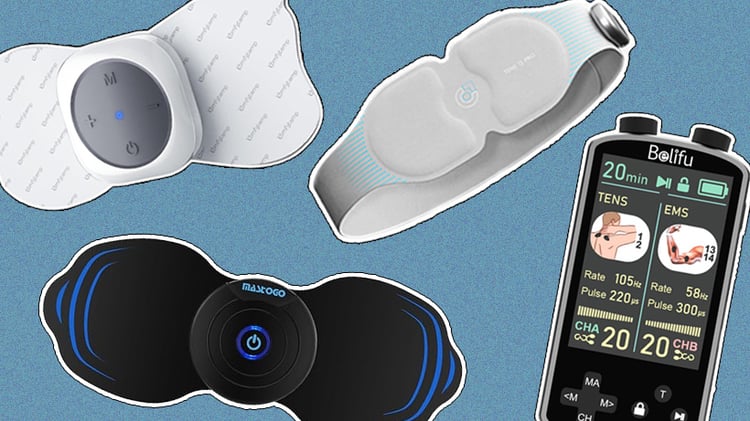
- Oxiline TENS Q Pro: Best for on-the-move wear
- Comfytemp Wireless TENS Unit: Best for first- buy value
- Belifu TENS & EMS Unit: Best versatile TENS therapy alternative
- MASTOGO Wireless TENS Unit: Best for easy experience
How we tested wireless TENS units
We spent nearly a month researching the technology behind TENS therapy and using some of the most popular wireless TENS units to put this guide together.
That said, because pain is highly individual, we can’t tell you whether a device will relieve your specific symptoms. Decades of research suggest TENS may provide short-term pain relief, but results vary, so it’s important to have realistic expectations.
Instead, we focused on what we can evaluate consistently in everyday use. We assessed how easy each device was to set up and operate, how comfortable it felt to wear, how portable it was, and whether its features justified the price. We also looked closely at practical details—battery life, intensity adjustments, and programs—since these aspects can make a big difference when using a wireless TENS unit at home.
Oxiline TENS Q Pro
Best wireless TENS unit for unrestricted movement
- Use for: Abdomen and lower back
- Modes: 6 modes with 3 heat levels
- Electrode pads: 4 integrated electrodes
- Size: Fits waists up to 36.6in (package includes 13in extender)
- Price: Low-to-mid
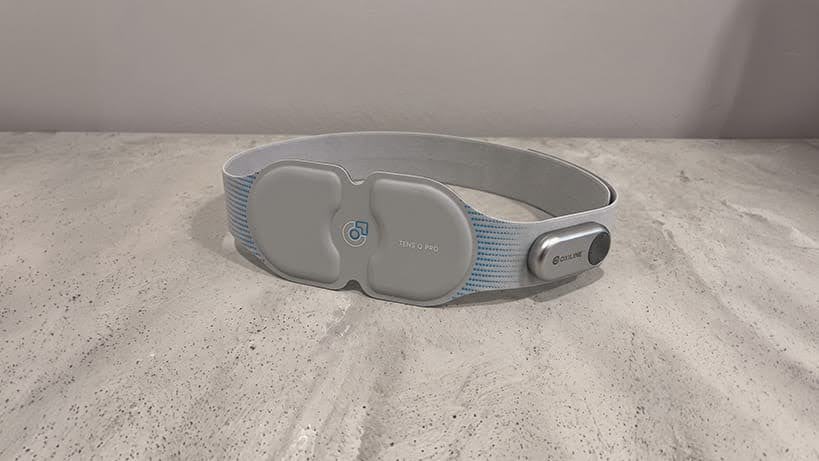
Our favorite pick, deserving the best wireless TENS unit title, is Oxiline TENS Q Pro. We’re not saying it’s the right choice for everyone, but if your main concern is lower back or abdominal discomfort, it’s one of the most convenient options we’ve tested.
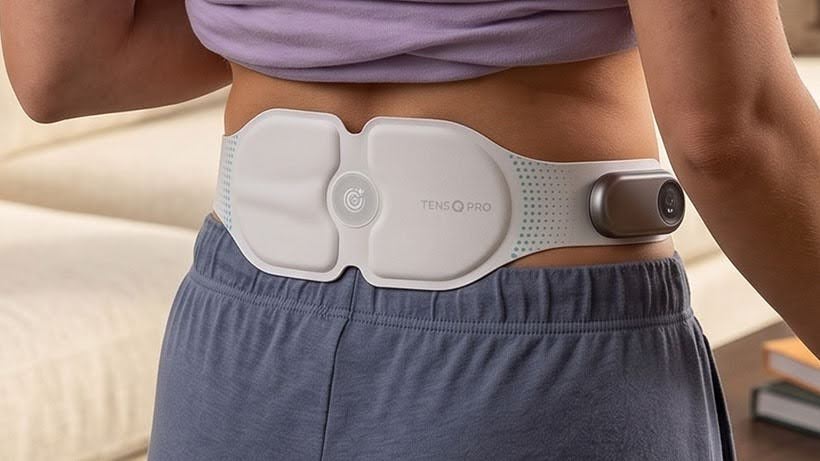
TENS Q Pro has electrode pads built into an adjustable waistband. This does mean you can’t use it on your shoulders, knees, or other parts of the body, but it’s also what makes it so easy to wear.
We found the setup took just a minute, and once the belt was in place, it stayed comfortable throughout the session. The waistband is thin, lightweight, and soft, made from Lycra material, which is very stretchy and contours nicely to your body without restricting your movements. It can get warm—especially when using the heat function—but with sessions lasting around 15 minutes for pulse massage and 30 minutes for heating, we didn’t find it bothersome.
Oxiline TENS Q Pro combines TENS and EMS in one device, giving you six stimulation modes and three heat settings. Mind you, the heating function reaches around 100–113°F, so if you enjoy heat therapy alongside electrical stimulation, TENS Q Pro will be a real gem for you.
As for drawbacks, we didn’t notice many. The brand says the rechargeable battery can last up to two weeks, yet in our testing we typically needed to recharge it after around three to five days following a 2-session per day recommendation. And, of course, if you’re looking for a wireless TENS unit to apply to multiple body areas, this probably isn’t the device for you.
- TENS combined with EMS and heat therapy
- Simple, easy-to-use remote control
- Waistband is soft, stretchy, and stays comfortable during sessions
- Designed only for the waist and lower back
- Settings aren’t very customizable
Comfytemp Wireless TENS Unit
Best value for your first wireless TENS unit purchase
- Use for: Arms, legs, back, and shoulders
- Modes: 30 modes with 20 intensity levels
- Electrode pads: 4 total (2 types)
- Size: Butterfly pads—5.2 x 2.4in; wired oval-shaped pads—3.5 x 2.8in
- Price: Low
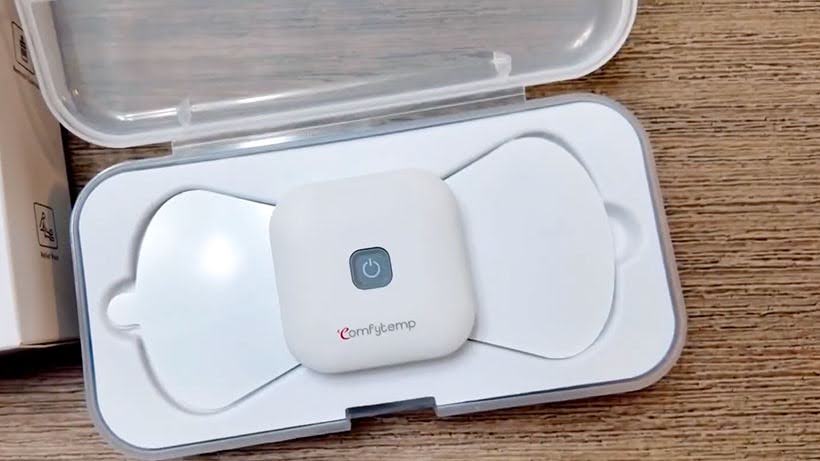
If you’re buying your first TENS device, Comfytemp Wireless TENS Unit is an easy option we recommend. Unlike the first place winner, it follows a more traditional wireless setup, giving you two compact hosts (controllers) and four electrode pads that can be placed on different parts of your body.
The electrode pads are comfortable to wear and, despite being sticky, peel off without pulling at your skin too much. As we mentioned, setup is easy and straightforward: first, you need to charge the host, pair it with the Comfytemp app, apply the pad, and choose from 30 modes, followed by adjusting intensity levels. You can even set session time anywhere from 10 to 60 minutes, and once the timer ends, the device stops automatically.
Naturally, portability is one of its biggest strengths. The lack of wiring makes it easy to move around the house, although we wouldn’t call it particularly discreet. The controller attached to each pad creates a noticeable square-shaped bump under clothing, so hiding it beneath well-fitted clothes isn’t very realistic.
Battery was another weak point in our opinion. Comfytemp doesn’t publish an expected battery life, but we needed to recharge the controllers every one to three days, depending on usage. Thankfully, a full recharge only takes an hour or so.
- Can be used on multiple body areas
- Very easy setup and app pairing
- Wide choice of modes and intensity levels
- Electrode pads may not stick if there’s lots of body hair
- Wireless hosts are bulky
- Battery life isn’t the best
Belifu TENS & EMS Unit
Best wired alternative
- Use for: Arms, legs, back, and shoulders
- Modes: 36 modes with adjustable intensity, pulse width, and frequency
- Electrode pads: 10 total (2 sizes)
- Size: Large—2 x 4in; Standard—2 x 2in
- Price: Low-to-mid
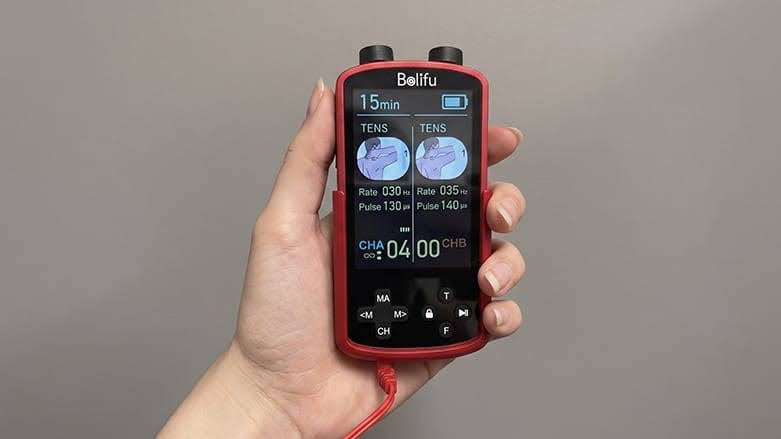
If you don’t mind a few cables and mostly plan to use your TENS unit at home, the 36-mode Belifu TENS & EMS Unit is a strong wired alternative. Compared with wireless models, it offers far more customization and plenty of accessories straight out of the box, making it a good choice for advanced users.
The setup is fairly traditional, even similar to the Comfytemp device. Yet in this case, the compact controller connects to the electrode pads with wires. Thanks to its dual-channel design, you can use up to four pads at the same time, plus there’re 10 reusable electrode pads that come in two sizes.
Just keep in mind that connecting four pads and using higher intensity settings drains the battery faster. In our testing, we averaged around two days of use per charge.
That said, we actually wouldn’t recommend Belifu as your very first TENS unit. It took us a while to understand what all the settings actually did, and getting comfortable with the controller was a trial-and-error type of process.
You see, with so many adjustable settings, it’s easy to get lost and, to be honest, tired. If you’re considering it, we suggest watching a few setup videos first, as they may help you familiarize yourself with the menu before receiving the device.
- A lot of reusable electrode pads
- You can personalize sessions to your liking
- Can power up to 4 electrode pads at once
- Electrode pads are small
- Navigating the controller is difficult
- Battery doesn’t hold for long
MASTOGO Wireless TENS Unit
Best for an easy, few-step routine
- Use for: Arms, legs, torso, and shoulders
- Modes: 12 modes with 20 intensity levels
- Electrode pads: 6 total (2 sizes)
- Size: Large: 7.14 x 2.9in
- Price: Low-to-mid
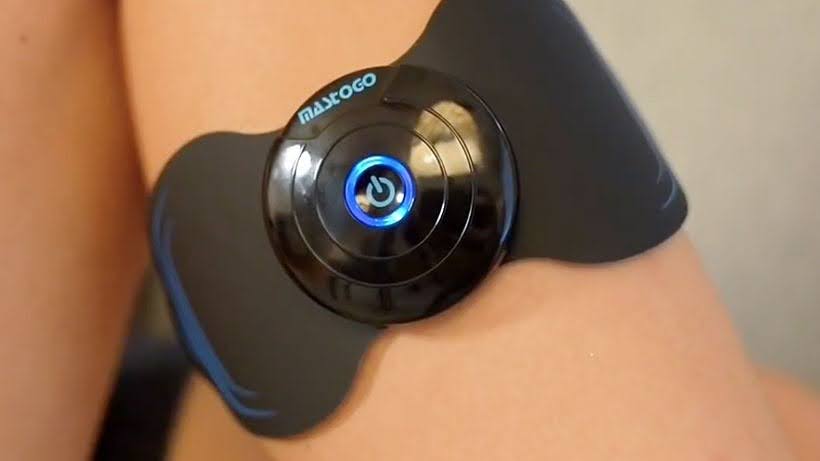
Rounding off our list is MASTOGO Wireless TENS Unit. Like the Comfytemp model, it follows a traditional wireless TENS unit design with separate controllers attached directly to the electrode pads. The biggest differences come down to the size of the pads and the shape of the controllers.
In our experience, the MASTOGO TENS unit’s larger electrode pads worked particularly well on broader areas like the back, abdomen, and thighs. You can still use them on smaller body areas, but we suggest employing the two smaller pebble-shaped pads for that purpose.
The round wireless controllers are another plus. Compared with the bulkier Comfytemp, they look more discreet under clothing, so you can comfortably wear them outside without strange looks. That said, they also felt quite plasticky.
Pairing the controllers with the DOMAS app only took us five minutes, after which you can access six TENS and six EMS modes, as well as adjust between 20 intensity levels. That was refreshingly simple compared to more complex models we tested.
The biggest drawback for us was battery life. We typically needed to recharge the controllers every one to two days, making MASTOGO the shortest-lasting device on our lineup. We also weren’t particularly impressed by the app interface—it works well enough, but its design feels dated.
- Includes both large and small electrode pads
- Wide selection of EMS and TENS modes
- Simple setup
- Battery lasted only a couple of days in our experience
- The app interface isn’t for everyone's taste
- Controllers feel a bit plasticky
Wireless vs. wired TENS units
After you started looking for a TENS unit, you probably noticed there are two main types: wireless and wired. Both use the same underlying technology to deliver electrical stimulation, with the main difference being how those electrodes connect to a controller.
Despite the name, a wired TENS unit doesn’t always need to be plugged into a wall. Instead, the electrode pads connect to a small controller with cables.
A wireless TENS unit places the electronics directly onto the electrode pad, so there aren’t any cables running across your body—a session is controlled by the buttons on a controller or via an app.
Which is better to buy?
Wireless models give you more freedom to move around, whether you’re doing chores, working, or heading out for a walk. They look more discreet in our opinion—sometimes like tapes for athletes or waistbands. Sadly, they also usually cost more than wired options because each module contains its own electronics, rechargeable battery, and other specific components.
We’d recommend a wireless TENS unit if convenience is high on your priority list. Throughout our testing, we found cable-free designs easier to wear and less likely to interrupt a session when moving around. If you plan to use TENS regularly or want to stay active even while wearing one, the extra cost may be well worth it.
That said, wired TENS units still have plenty to offer. They’re typically more affordable, have the same type of electrical stimulation, and are a great choice if you’re planning to use the device while relaxing at home.
The only real compromise is you have to remember the cables are there—move too quickly or snag one with your hand, and you may find yourself needing to reattach an electrode again and again.
How to safely use wireless TENS units?
Using a wireless TENS unit is generally simple, but safety is just as important as choosing the right device. When used as directed, TENS is considered safe for most people, with serious side effects being very rare.
The most common issue is mild skin irritation beneath the electrode pads, like temporal redness, itching, or general tenderness. Still, a wireless TENS unit isn’t the right choice for everyone, so we always recommend checking with your doctor before trying one.
Unless a healthcare professional gives you a green flag, you shouldn’t use a TENS unit if you:
- Have a pacemaker or another implanted electrical device
- Have epilepsy
- Are pregnant
- Have active cancer
- Have a history of deep vein thrombosis
- Have certain heart conditions
Don’t use the device while driving, sleeping, or in any environment where water is present.
Where should you place the electrodes?
Don’t worry, getting the electrode placement right is simple and there’re very few mistakes to watch out for. With most at-home wireless TENS units, place the electrodes around or over the painful area—just not directly on open wounds or fresh scars.
To reduce the chance of skin irritation, apply the pads only to clean, dry skin and avoid lotions beforehand. If you develop persistent redness or even a rash, stop using TENS and speak with a healthcare professional.
Avoid placing electrodes over your eyes, head, on the front or sides of your neck, or one pad on the chest and the other on the back.
When you’re ready to start, begin with the lowest intensity and slowly increase it until you feel a strong but comfortable tingling sensation. It shouldn’t feel painful. Finally, worn pads may reduce performance and irritate your skin, so don’t forget to replace them once in a while.
What should you look for in a wireless TENS unit?
At first glance, most wireless TENS units may look remarkably similar to you, with only a few standing out from the crowd. Once you start comparing them, though, the differences become much clearer. To help narrow down your options, here are the features we’d pay the most attention to before buying:
- Electrode pads and targeted area. Think about where you’ll actually be using your TENS unit. If you’re mainly dealing with lower back discomfort, larger pads like MASTOGO’s or a wearable waistband such as Oxiline TENS Q Pro may be a fit. For smaller areas like the knees, arms, shoulders, or elbows, compact pads are better.
- Controllers (hosts). Check how many wireless controllers come in the box. Models with two hosts, like the Comfytemp option, let you target two separate areas at the same time.
- TENS vs. EMS. Decide whether you only want TENS or a combination of TENS and EMS. Most modern wireless models, including every device in this guide, combine both technologies in one unit.
- Modes and intensity. Don’t get too caught up in the number of modes. We found that clear controls and adjustable intensity levels matter far more than having dozens of programs you’ll never use.
- Battery life. If you plan to use your TENS unit regularly or while you’re out and about, battery life becomes especially important. Most wireless models are rechargeable, but their runtimes vary noticeably.
- Replacement pads. Electrode pads won’t last forever, so it’s worth checking that replacements are easy to buy and come at a reasonable price.
- Warranty and support. Don’t overlook warranty and customer support. A solid warranty won’t improve the therapy itself, but may save you a lot of frustration if something goes wrong.
Other wellness & recovery reviews:
Best TENS units: Tested, compared, and ranked
Best TENS units for back pain: Finding the right fit
TENS machines for labor: Devices to consider during pregnancy and childbirth
Best TENS units for sciatica: Features to consider and our recommendations
-
BMJ Open.
-
The Journal of Pain.