Fitbit Air review: Breathing new life into screenless bands

- Slim and light band design
- Reliable sleep stats and heart rate tracking
- AI Coach is surprisingly insightful
- Price is hard to argue with
- The Google Health app needs de-cluttering
- Coach and other features require a subscription
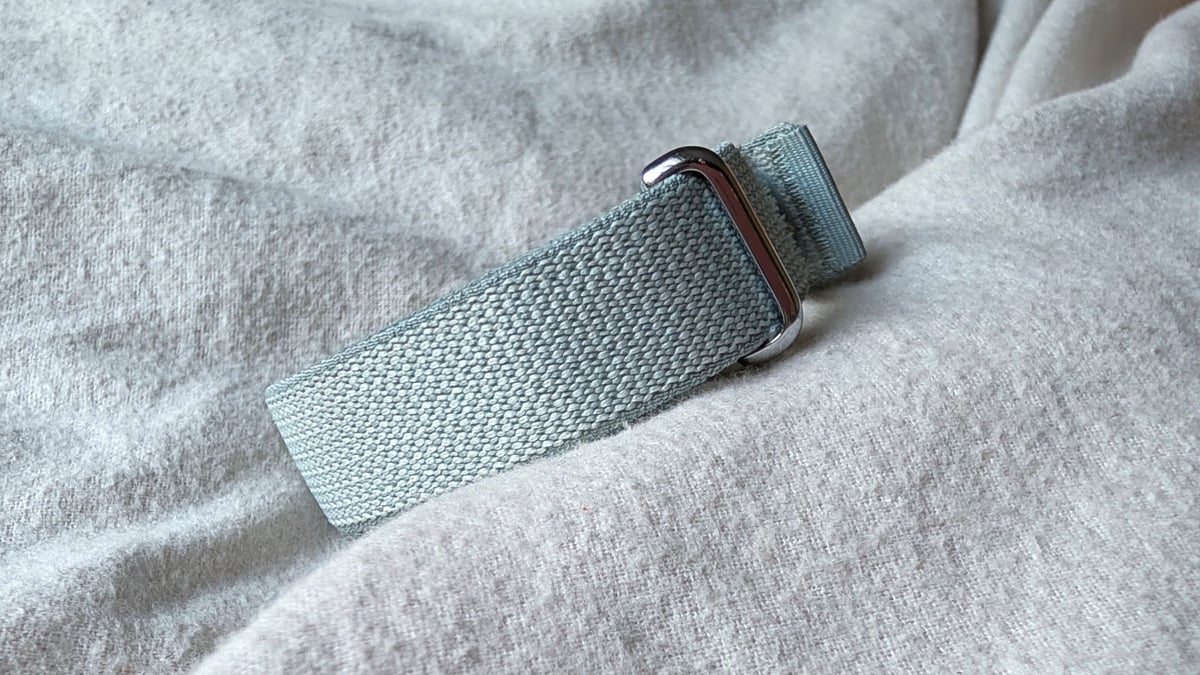
- The strap can get a bit grubby
Screenless wearables have truly hit the mainstream in 2026. Smartwatches and sports watches may not be going anywhere, but this year's biggest wearable launches—including the Fitbit Air—show that brands are trying to reach the people experiencing screen fatigue.
Undoubtedly, it's why Whoop and others have struck a chord with fitness tracker fans who want fewer distractions but still want in-depth data to sift through post-workout.
The display-less Air is one of the latest in this new sub-category of wearables, building on the brand's heritage as the name synonymous with fitness tracking.
Throw in Google’s software smarts—including some on-trend AI ones—with a design clearly inspired by the band the entire industry is trying to beat, and there are all the ingredients to make the Air a compelling buy. Like most other competitors, it's also subscription-free... for the most part.
We’ve been wearing it for the past few months to see whether the Air is a true screen-free competitor or a pretender trying to take a swipe at Whoop's crown. Here's our full review.
Price and competition
The Fitbit Air launched at $99.99, making it one of the cheapest screen-free bands on the market.
How does it stack up with the competition? Let’s start with the Whoop 5.0 and MG.
Both Whoop devices require an ongoing subscription, or you won’t be able to access the companion app or its features—which can cost anywhere from $199 to $359 a year, depending on the plan you pick.
Then we have a growing collection of subscription-free bands. There's the Polar Loop (Gen 2) and Garmin Cirqa, priced at $199; the Amazfit Helio Strap at $99.99; and the $149 Luna Band, now globally available after a reveal earlier this year.
As mentioned, you don’t need a subscription to use the Air, but some features require a Google Health Premium subscription to unlock. That Premium subscription costs $9.99 a month or $99.99 a year, which, as highlighted, is still cheaper than any of Whoop’s subscription plans.
Design and comfort
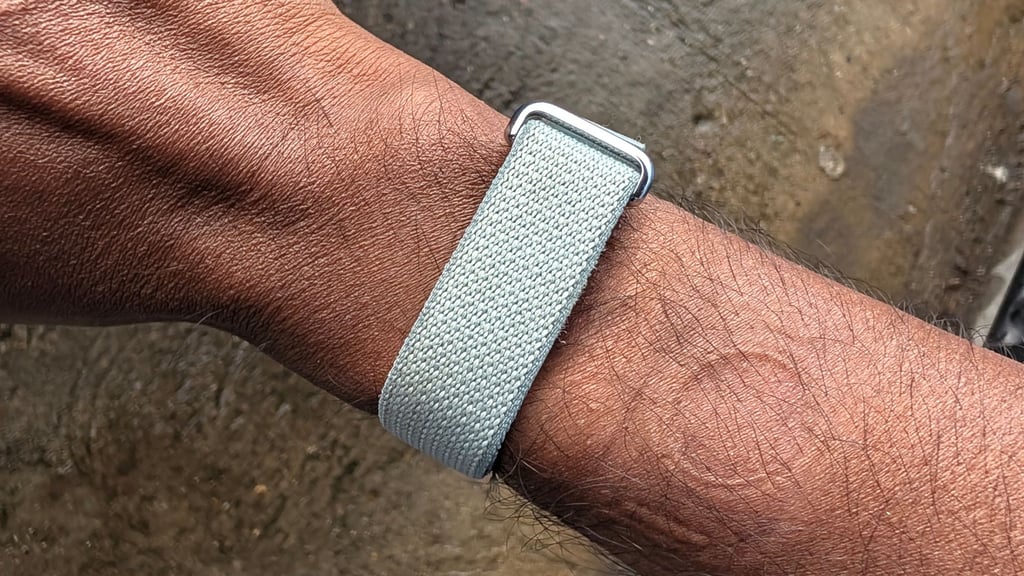
Like most smart rings that launched after the Oura Ring, the bands that have launched since the Whoop have largely settled on a similar fabric band to hide the hardware.
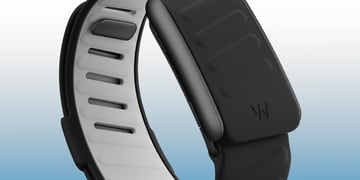
The Air adopts a similar look. However, unlike other trackers, it opts for a much slimmer design. This means it takes up less wrist space and offers sufficient room if you still want to wear a watch on the same wrist.
That band part comes in four colors and is available in either a textile or silicone look. Choose the latter, and you'll have two size options. The textile strap only comes in one size. It also uses a Velcro clasp, making it easy to whip on and off.
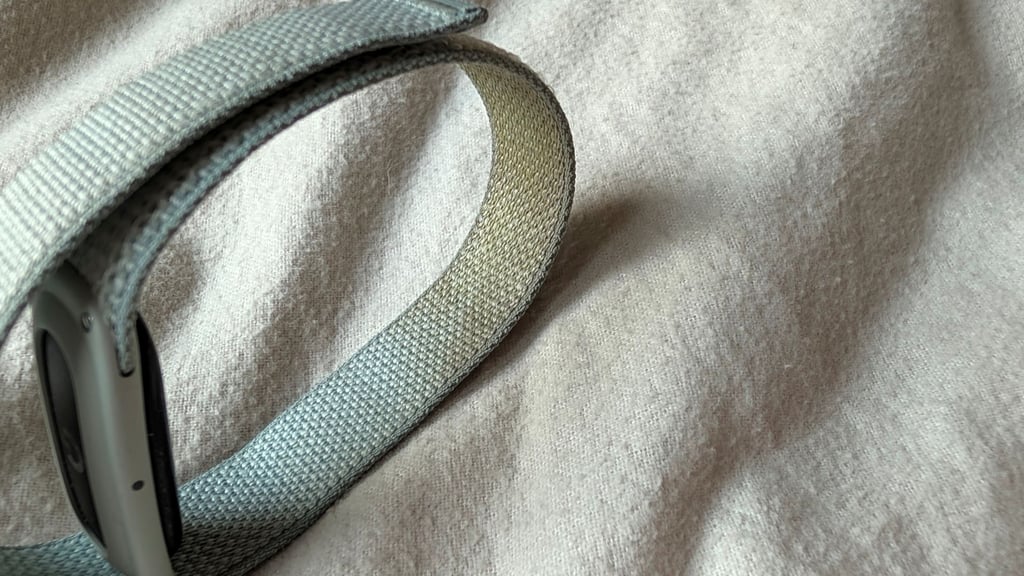
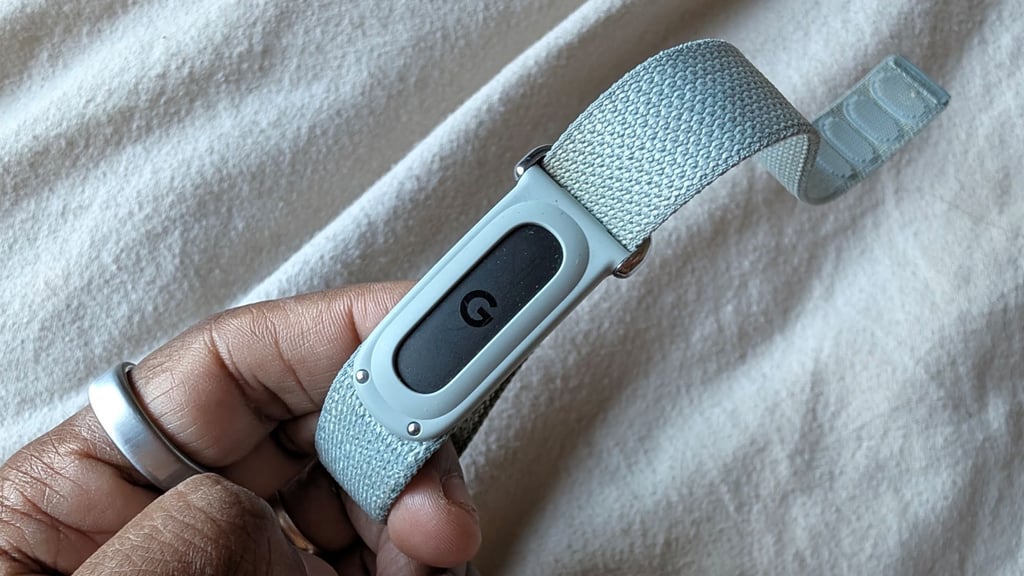
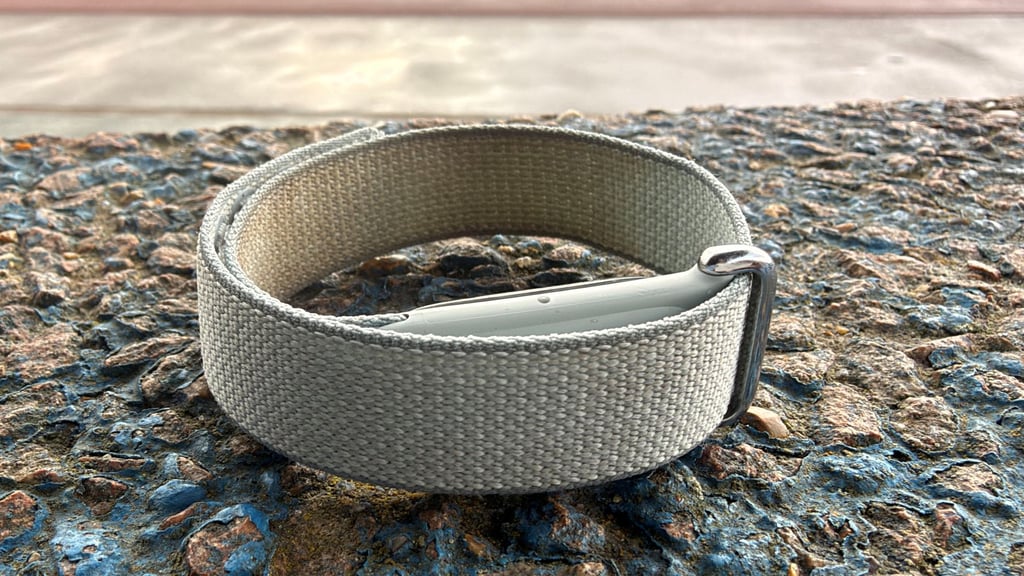
One thing we’ll say about that textile strap is that it's started to get noticeably grubby on the inside after a few months of wearing it day and night, as shown below.
The 5 ATM waterproof rating means it can be submerged up to 50 meters deep.
In reality, it means that if you take it in the shower, go for a swim, or get caught in a downpour on your lunchtime run, the Air will keep on tracking. Thankfully, when it does get soaked, it dries quickly.
Currently, you can only wear the Air on your wrist. Since the Air’s launch, though, Google has released design guidelines for accessories.
This means opening the door for third-party accessory makers to create new looks for the Air. So, we could see the Air get an armband strap, like the ones you get with Whoop, Garmin, and Amazfit bands.
The refreshed Google Health app
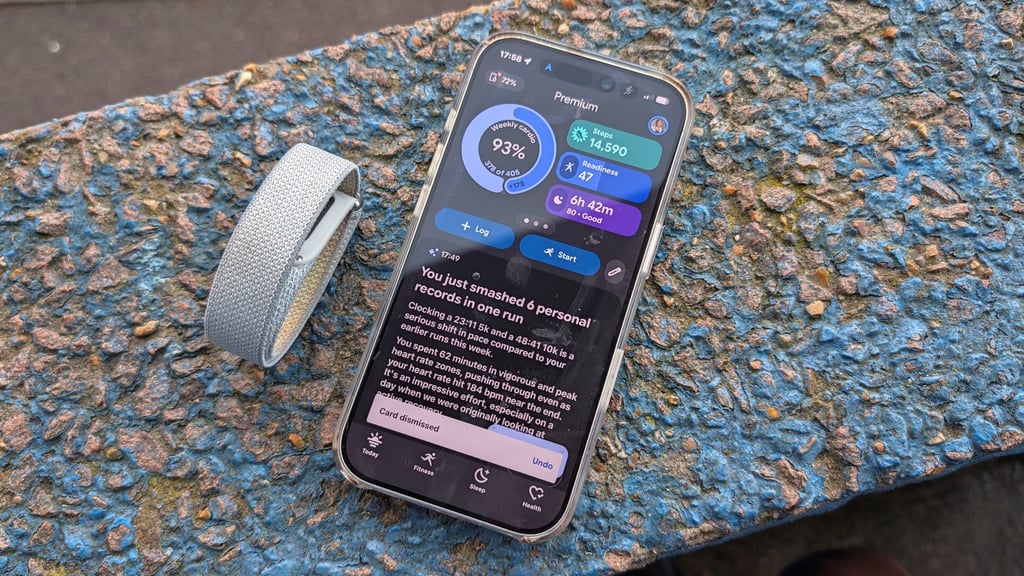
When it’s time to look at a screen, you’ll need to download and install Google Health.
This is where you’ll review your Air stats, plus everything else Google offers, to stay on track to hit your health and fitness goals. Unlike Google’s Pixel Watch, this is also, mercifully, a wearable that works with an iPhone.
Now, the platform (formerly known as the Fitbit app) has certainly lost some of the charm that made it so approachable and user-friendly.
This is now a graph-heavy interface that feels like too much is being crammed into the app's main sections. If you sign up for Premium and use the AI coach, it brings in a lot of text, which makes the app feel busy.
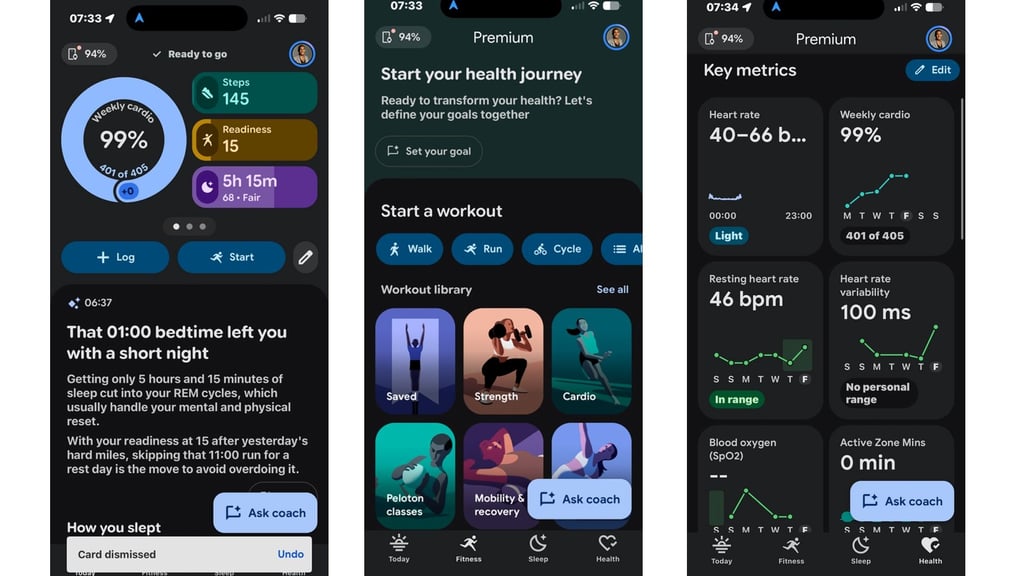
That brings us to another important topic: the claim that the Air is a subscription-free band. As we pointed out above, that’s not technically accurate.
Yes, you can use the app for basic fitness tracking, like counting steps, measuring sleep, tracking key vitals like heart rate, and accessing Fitbit readiness scores. To access the AI-powered coach, a library of workouts, or personalized fitness plans, you'll need to pay. These feel like meaty features missing from the free version of the Health app.
It’s an app that also seems to fall into the trap of being built for multiple wearables, not just the Air. Samsung has a similar issue with the Galaxy Ring, using the same app as all of its smartwatches. Whoop and Oura show the value of an app built for one device; the experience feels much more tailored.
Activity tracking and heart rate tracking
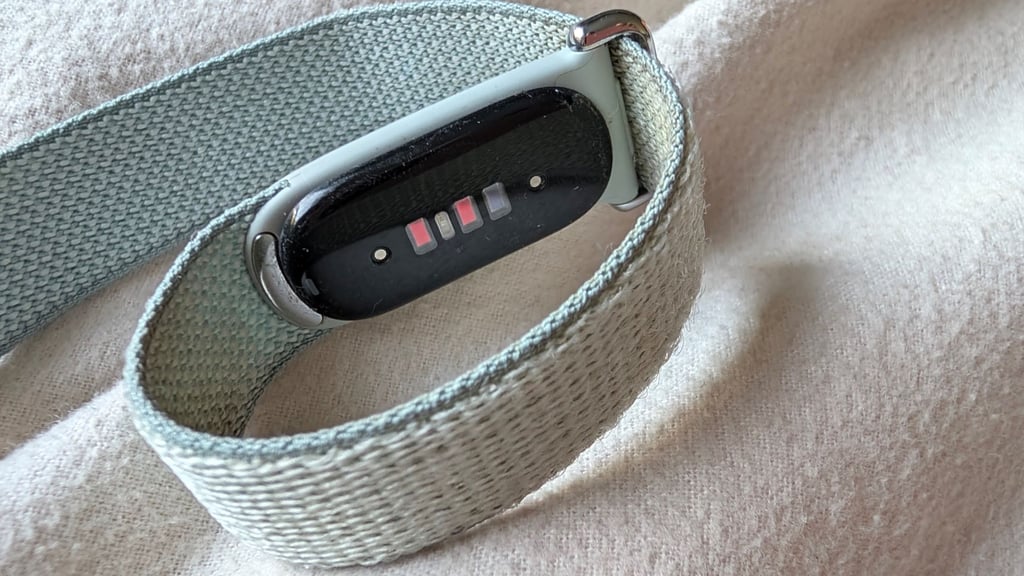
In essence, the Air does much of what other bands do. It’s got the same sort of accelerometer and gyroscope motion sensors to track your movements. There’s also an optical heart rate monitor and red and infrared sensors to track changes in oxygen saturation. Last up is a temperature sensor to deliver skin temperature variation data in the Health app.
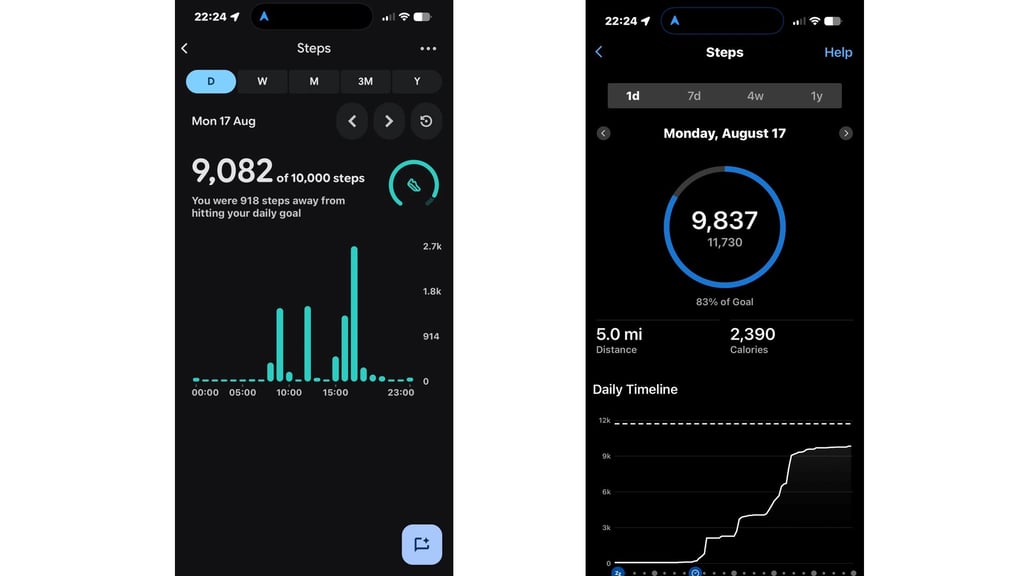
Activity tracking centers on step counts, which you can see plotted over the day, week, month, and year. The Health app presents that data in graphs and shows how many steps you’re away from your target, or whether you’ve exceeded it.
From an accuracy standpoint, we’ve been comparing step totals across a range of trackers. While trackers use the same sensors to track steps, the algorithms that crunch the data are usually different.
So what you’re hoping for is data in the same ballpark. In the case of the Air, it was very much in the same ballpark of most trackers we tested it against.
As for compelling features to motivate you to keep moving, you don’t get inactivity alerts or anything else that encourages that movement.
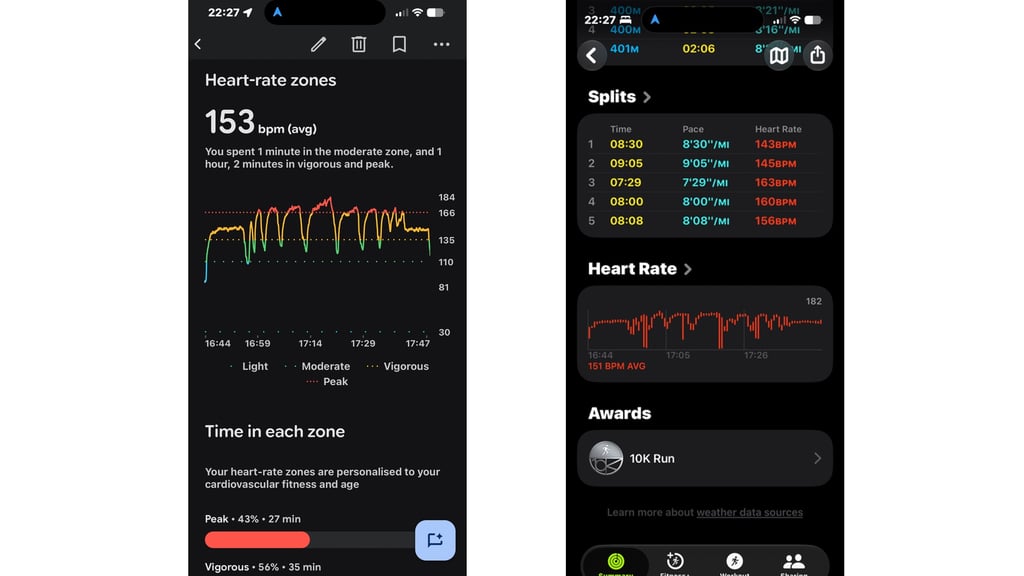
Heart rate tracking is key to much of what the Air can do and tell you. Beyond continuous heart rate tracking, it also records resting heart rate and heart rate variability measurements and provides VO2 max scores to review.
In our months of testing, the continuous heart rate monitoring has generally been accurate, with no major blips or dropouts that skewed the overall story of our data.
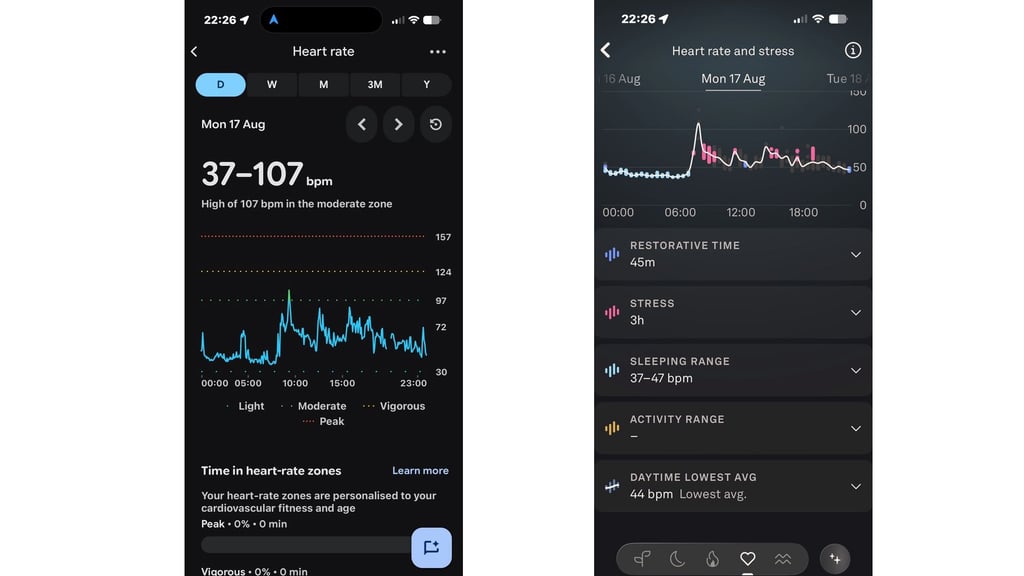
Upping the intensity during exercise wasn’t a horror show, either. When we tackled an interval running session against a heart rate monitor chest strap, it produced similar heart rate graphs, with average and maximum heart rate readings within 1-2BPM.
Given the smaller sensor, we didn’t anticipate the tracking performance we got from the Fitbit Air in this department.
However, when you look at the more advanced heart rate metrics, the Health app again presents these data points poorly. Google and Fitbit could do a much better job of adding context to your data so you can tell when things look good or a bit off from the usual.
Sleep tracking and insights
Sleep has always been a strength for Fitbit, even in its early-generation devices. Screenless bands are the ideal distraction-free wearables to wear to bed, and the Air is one of the most unobtrusive ones to sleep in.
When you do, you’ll see some pretty standard things in the sleep section of the app, like sleep stages, assessment of sleep quality, and trend graphs for metrics like REM sleep and time spent in the important deep sleep stage.
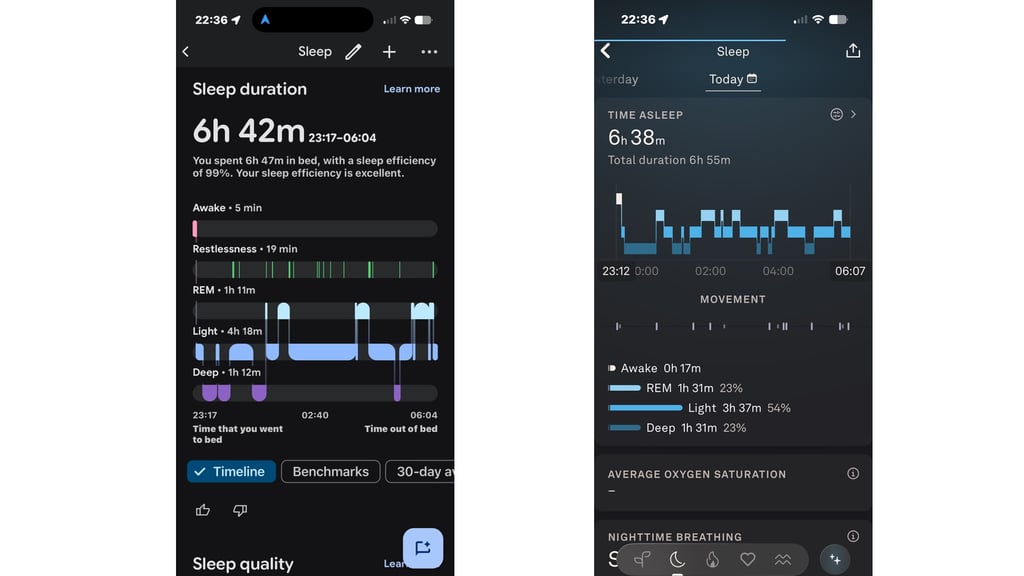
With Google Health Premium in play, there’s just too much text on screen. What it’s telling you, in essence, is useful, but getting to what’s useful feels harder than it should be—whether that’s similar sleep scores, a dip in sleep duration, or insights into periods of deep and REM sleep stages.
The insights and added features on offer need work. It currently feels caught between throwing lots of data and words at you and presenting data in graphs and using color-coded gauges to indicate whether elements like sleep quality are in good shape.
Training features and insights
If you’re looking to use the Air as a training companion, getting the best experience on that front pretty much requires signing up for Premium. If you don’t, you’re missing out on some notable features.
In its free mode, you can use automatic and manual workout tracking. The former is pretty good at picking up walks, runs, and activities like HIIT. For more stationary workouts, it can take a bit longer to recognize when you’ve started working out.
Take the manual tracking route: pick your activity, hit start, and get moving. This will turn your phone into a real-time dashboard if you need to keep an eye on your progress.
One glaring omission is that if you accidentally track a workout, you still need to save it before you can delete it. It seems like an unnecessary extra step. Using your phone’s connected GPS also ensures you capture a GPS track from your workout.
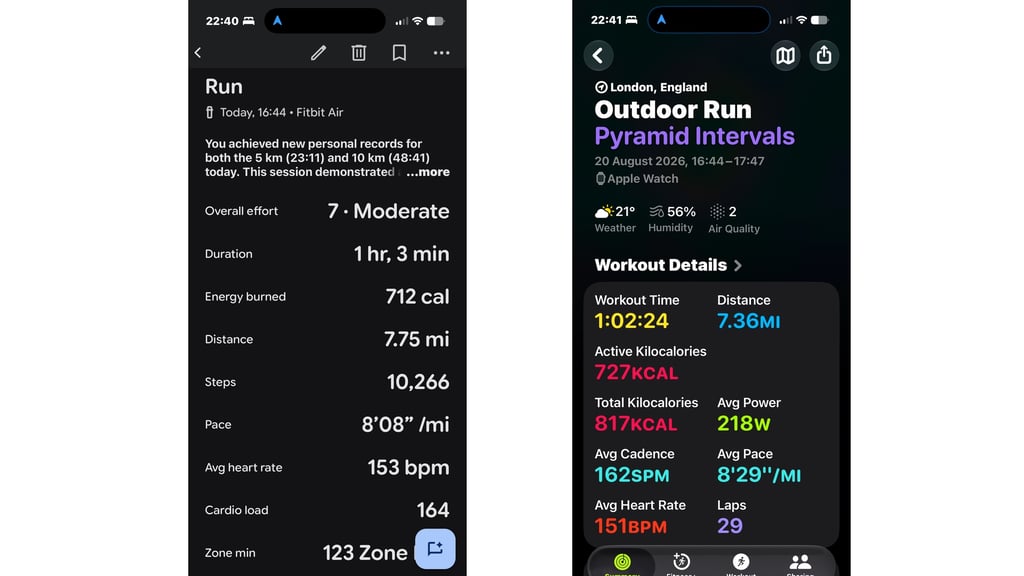
In your post-workout stats, one metric you’ll see is cardio load. This metric helps you track how much training you’re logging. If the score is low, it means it wasn’t a super demanding workout. If it’s high, then you went at it.
This workout data also powers Daily Readiness scores, a metric offered by Whoop and Oura. What’s good about Fitbit’s approach is that it shows you what contributes to your readiness scores. Those scores didn’t always align with Whoop and Oura’s scores until about a few weeks into testing, when they felt more in line.
If you decide to pay for Premium, you can expect to see much more text in the app.
This is Google’s AI health coach, powered by Gemini, that analyzes and summarizes your day and night data. You can also ask questions about your data. In the realm of good and bad AI coaches, this one is one we’d consider to be good.
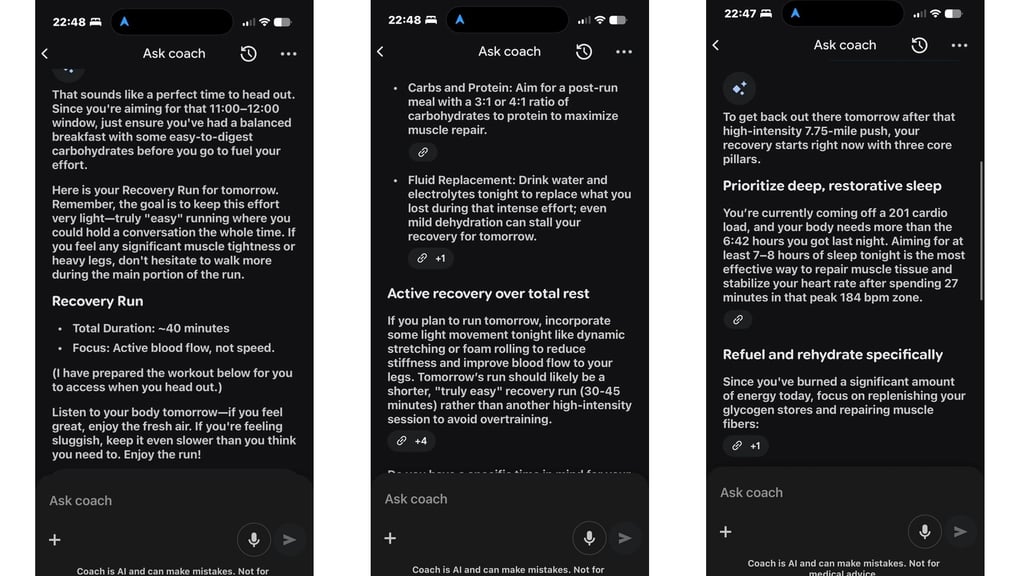
Is it perfect? No. Has it provided useful summaries about broken sleep, offered useful recovery advice for back-to-back workout days, or explained the value of going for a stroll after a tough workout day? Yes.
The core idea behind what Google is trying to do here is good. Much like Garmin’s take on AI intelligence, the more data Google has to look at, the more useful it can become in guiding you to make decisions about your day. There’s definite promise here.
Beyond the AI coach, you’re looking at features like access to adaptive fitness plans, a pretty expensive workout library, and a series of mindfulness sessions. We didn’t feel compelled to use these features regularly, so it mostly feels like you're paying for the coach, which unfortunately adds a lot of text to the app.
Battery life
The Fitbit Air promises up to seven days of battery life. For context, estimates from other bands show that the Whoop lasts up to 14 days, the Garmin Cirqa and Amazfit Helio Strap last 10 days, and the Polar Loop lasts 8 days on a single charge.
So basically, you’re looking at the shortest battery life of any of the major bands launched so far. Does it make the Air frustrating to use? No. Does it typically reach the seven-day maximum? Not always. Generally, you can expect just shy of a week from it.
Once it is flat, it’s time to drop it onto its proprietary charger, which at least supports fast charging. A 5-minute charge gives you another day of tracking, so it’s ideal if you forgot to plug it in overnight and need a quick top-up.
How it compares to the competition
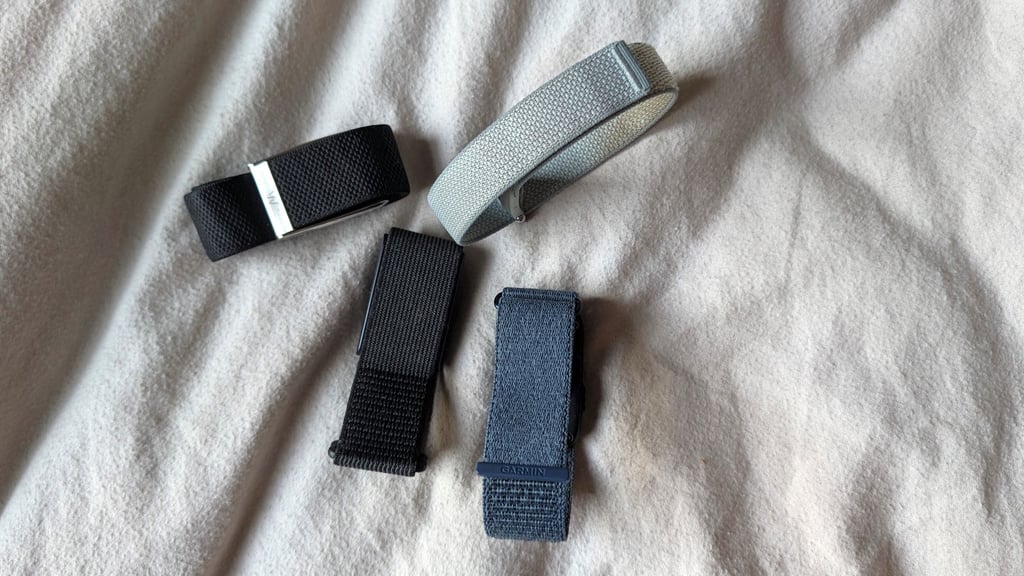
Let’s start with Whoop. The Air feels nice to wear and also doesn’t simply mirror Whoop’s band design. It offers similarly strong sleep and core tracking, though Whoop lasts longer off a single charge. Whoop's app experience shows it’s been around longer than Google in this arena. While new features keep being added to the ecosystem, the Whoop app's presentation, focus, and organization are more polished.
The Garmin Cirqa is more expensive and less attractive than the Air, but it offers some well-established, well-liked Garmin training features. Unsurprisingly, it’s driven more by its sports features—and is a great fit for those already in the Garmin ecosystem.
In some senses, that's also true of the Polar Loop, too—which, again, is arguably a more stylish-looking band than the Air. However, the lack of software focus and erratic automatic workout tracking—not to mention the price—make the Air the better pick.
There’s also Amazfit’s Helio Strap and Strap Pro. The standard Strap uses the same app as Amazfit smartwatches and does provide value if you use both an Amazfit watch and the screenless device together. It can last a little longer between charges and offers strong heart rate tracking, with the option of an armband to move tracking away from the wrist.
In short, the Air can more than hold its own against the competition. It’s an easier recommendation than the Polar Loop, for starters. It lacks the software polish and more comprehensive workout tracking you do get on the Whoop, and, to a similar extent, the same can be said of Garmin’s Cirqa.
The Air package has enough to make it wrist-worthy for a lot of people. If Google and Fitbit can bring more of the old Fitbit app into the Google Health app, then it will be a more complete package. Hands down, those looking for a more bank-balance-friendly option should be looking at the Air. It’s just a shame the AI coach and some other extras aren’t part of the free Air tier.