- Leading accuracy with effectively zero dropouts
- Latency advantage over even the best wrist-based optical sensors
- Removable, machine-washable sensor pod
- Rechargeable battery that comfortably lasts months between charges
- Expensive—even by Garmin's standards
- Proprietary charging instead of USB-C
- Insights are largely wasted if you're not a runner
- Exclusive metrics are vague and hard to act on
Even as wrist-based optical sensors on flagship smartwatches improve, the form factor's positioning means it will always struggle to match the latency or precision of a dedicated chest strap. And Garmin's HRM 600 has a strong case to be the definitive tracker in the category.
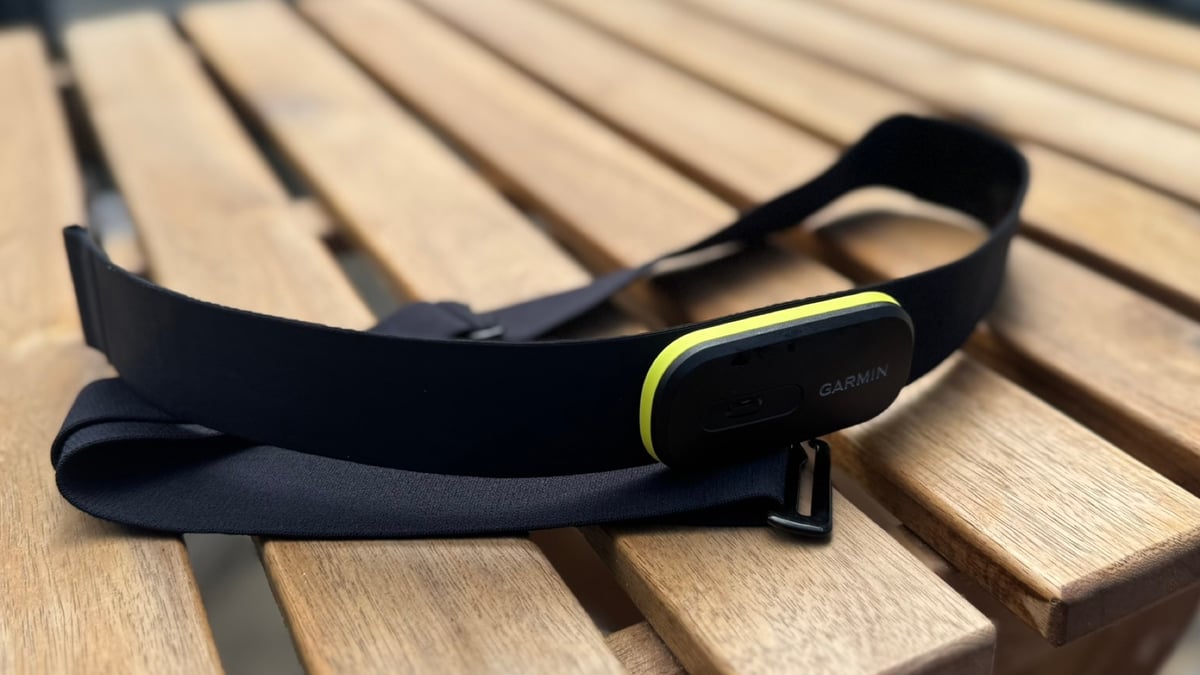
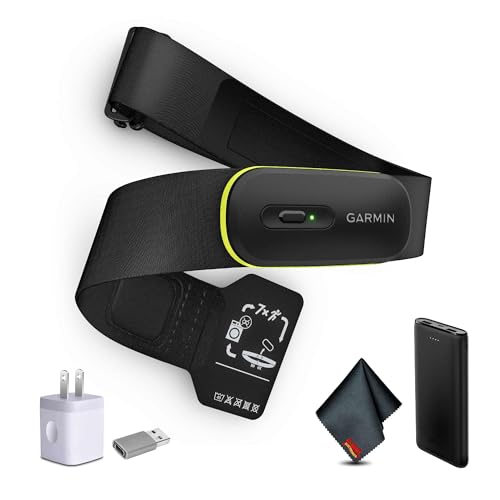
Replacing the older HRM-Pro Plus, this strap transmits real-time heart rate and HRV over ANT+ and three simultaneous Bluetooth channels. It also builds on its predecessor by—mercifully—adding a detachable, machine-washable module, a rechargeable battery, and an expanded suite of running metrics aimed squarely at data-driven athletes.
On paper, Garmin's pitch is that the HRM 600 negates the shortcomings of wrist-based heart rate tracking—latency, dropouts, and shallower running data—while still delivering standalone activity recording for when you don't want a watch on your wrist at all.
That's a lot for one accessory to live up to, and most chest straps don't need to try this hard to do their job well.
This review is the result of putting those claims to the test over 15 months of near-daily use across marathon training blocks, gym sessions, pool swims, and side-by-side benchmark testing.
The core accuracy, latency, and reliability claims hold up entirely, even if some of the newer software additions prove to be more of a mixed bag. Below is the full breakdown.
Why the HRM 600 is a gold-standard reference
I test heart rate accuracy for a living—in the loosest possible sense—and the HRM 600 has been the fixed point I measure everything else against since it launched in May 2025.
Readers will have seen its numbers before, even if they didn't clock it. This is the same chest strap used in the reference data for our Apple Watch Ultra 3 review, Samsung Galaxy Watch Ultra 2 testing, and countless others over the last year.
In that time, I can't point to a single instance where it's dropped a reading or failed to connect to a device I wanted it paired with.
That includes cold, damp UK weather that regularly trips up watches, as well as every flavor of running session I can think of: short, sharp intervals where lag matters most; long steady-state marathon-block miles; and half marathons run at race effort.
I've also deliberately pushed the limit of three simultaneous Bluetooth connections, pairing it to multiple devices at once for side-by-side testing on the indoor trainer without a single hiccup.
In that spirit, let's run through some examples to demonstrate latency and accuracy.
Easy mode: The indoor cycling test
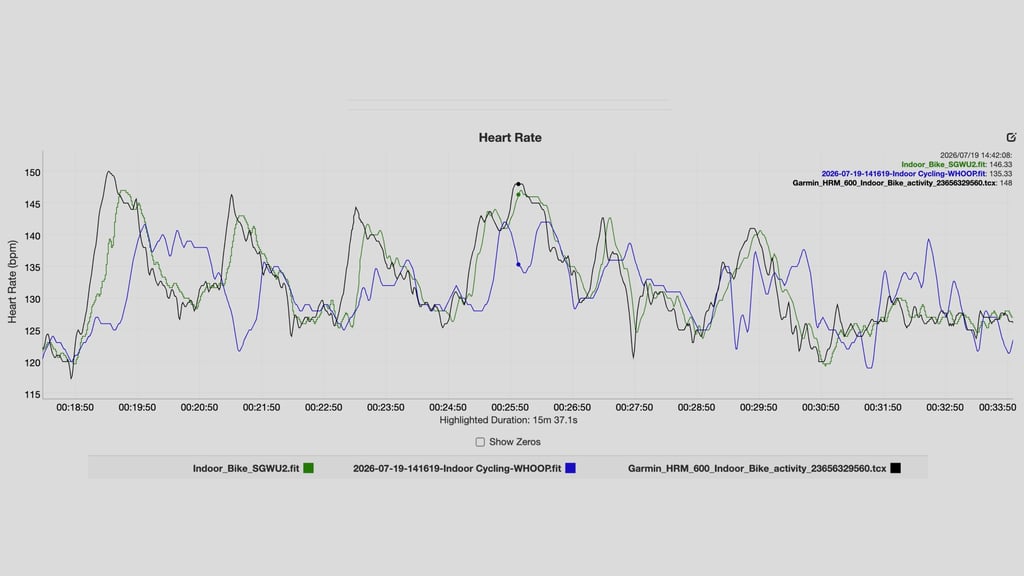
- The full workout session data comparison is viewable here
This session is one I've borrowed from the recent Galaxy Watch Ultra 2 review—in which, as a side note, the Samsung smartwatch actually performed extremely well.
Long indoor cycling sessions are what I typically start any test with, as they provide a motion-controlled environment—ideal for evaluating optical HR data without vibrations or wrist-flex issues.
In this continuous 3-hour indoor spin workout, the heart rate metrics recorded across all three devices were exceptionally tight:
- Garmin HRM 600 chest strap: 134.00 bpm average
- Samsung Galaxy Watch Ultra 2: 134.36 bpm average
- Whoop MG: 132.50 bpm average
However, you don't buy a device like the HRM 600 for the session averages—plenty of optical, wrist-based sensors can consistently get within striking distance of a chest strap nowadays. It's mostly about the latency.
For example, the 15-minute snapshot above shows that the chest strap was the first to respond to the mini-interval surges and recovery drops every time.
In this case, the Galaxy Watch Ultra 2 did actually respond quickly enough to grab the general gist of an interval—but you can see from Whoop's data that each interval is effectively missed because of the latency.
Medium mode: Sustained outdoor run
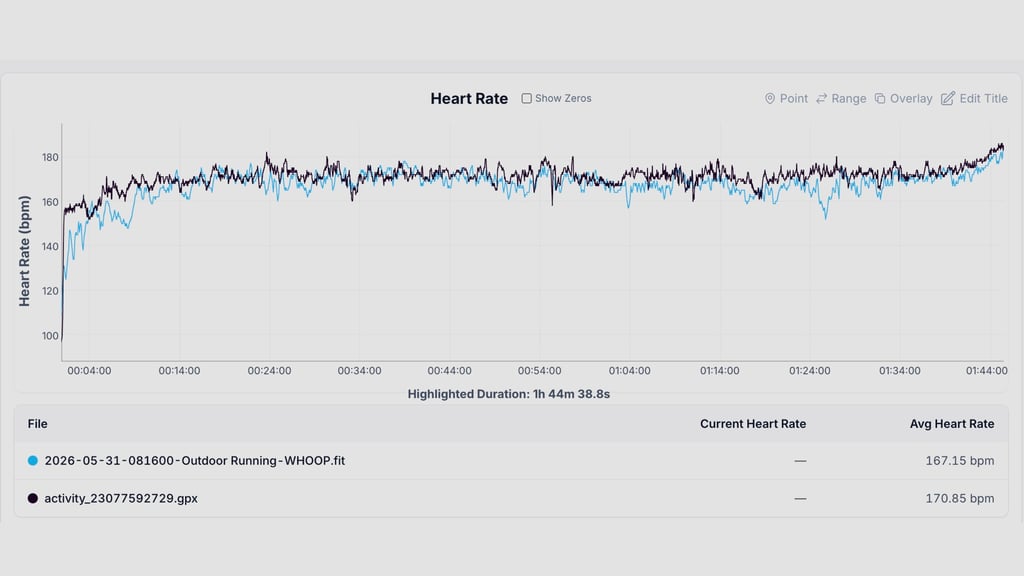
This is an example I've actually not used before in a review—mostly because wrist-based sensors, as I allude to above, can generally get within a few BPM of a good chest strap over a sustained effort.
That's what we have here, a half-marathon test that follows the general HR arc you would expect: a sharp start and heart rate drift as the race goes on.
Unlike in the example above, where latency was the key factor, sessions like these are more about over- or underreporting.
And in that sense, we can glean that the Whoop MG—even if it captures the broad outline well enough to stay within 3 BPM overall—has long bouts of underreporting compared to the chest strap.
When you factor in the context, like it struggling to capture the spike at the start of a race and being shy about hitting higher heart rates in a final-mile push, we can clearly show where the HRM 600's value lies in these kinds of sessions.
Hard mode: Interval running session
This test is one I performed during the initial tests of the Apple Watch Series 11 last September. It's another session with intervals—though this time they last longer and must contend with outdoor variables.
During an eight-session effort, which you can view in full here, the Series 11's optical sensor actually did a very impressive job of keeping pace with the HRM 600. However, the chest strap is still ever-so-slightly quicker to respond (or it's right in line) in each interval.
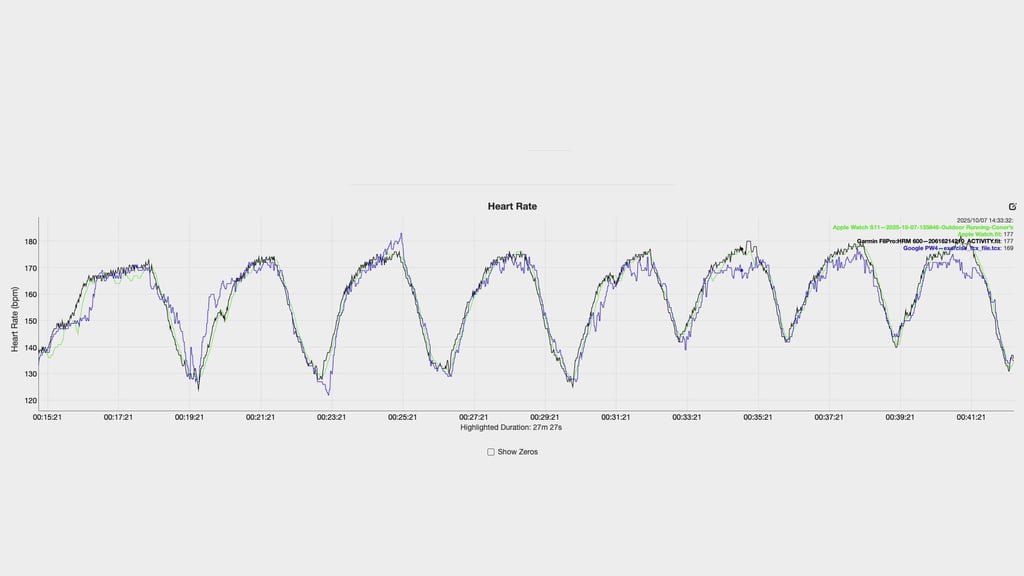
It's also about the consistency of this kind of performance. The Apple smartwatch is often exactly where it needs to be—even in intervals—but with an optical sensor, you're always at more risk of it missing the mark compared to a chest strap.
Pricing—and what you're actually paying for
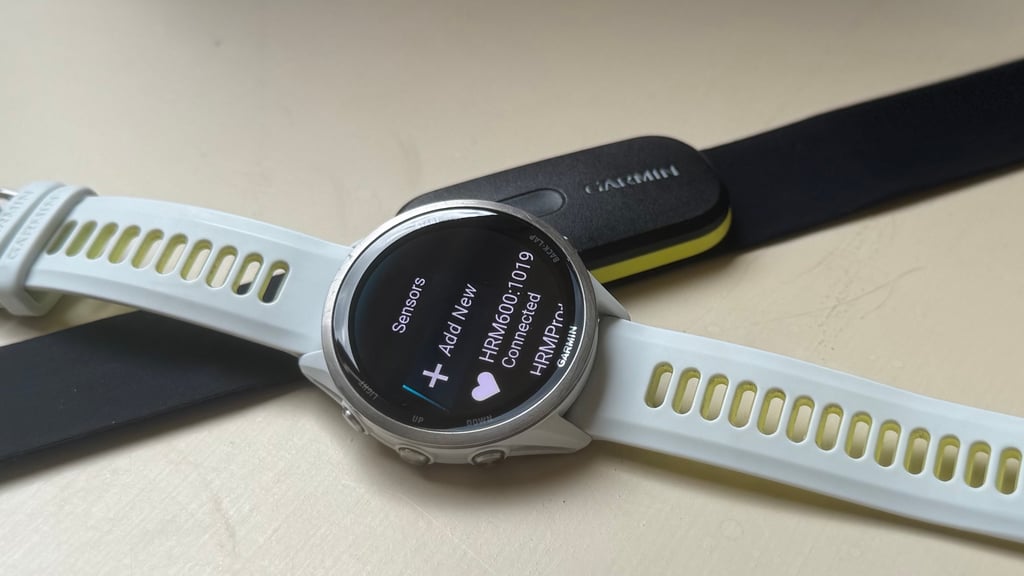
With an MSRP of $169.99 / £149.99, the HRM 600 is a lot of money for a single-use, supplementary device.
It's a big step up from the HRM-Pro Plus it replaced, and also well above what you'd pay for a basic strap. Again, you can get perfectly serviceable heart rate accuracy for a fraction of the price if all you want is a session average number.
None of the lofty price stuff is unusual for Garmin specifically, but it's worth being upfront that this sits at the expensive end of a non-essential category.
What you're paying for is the gap between a chest strap and a wrist-based watch, as demonstrated by the three examples above. And, in my experience, that gap is real and worth caring about if you're serious about your data.
The core difference explained
In very simple terms, the HRM 600 can respond to a change in effort many seconds faster than a wrist-based optical sensor. Sometimes it's 2-3 seconds, and sometimes it's 10-20 seconds. The Apple Watch is, in my testing, the best of the wrist-based crowd for latency—and it's still often not really in the same conversation as a chest strap when you factor in all the variables.
If you train off a pre-planned, structured session and want the most accurate possible picture of what's happening in real-time, later feeding that into whichever platforms you use, latency and consistency aren't a nice-to-have; they're the entire point.
Sometimes, after all, those 5- 15 seconds can make up a significant portion of a running interval, burst on the bike, or set in the gym. If your device is lagging, the picture can often become entirely skewed.
That's why chest straps are the gold standard. Like any consumer tech, though, no chest strap is infallible. Accuracy can still wobble in the water, and no sensor is bulletproof. But, as a category, chest straps remain a clear step above wrist-based optical for long-term consistency.
It's also worth flagging—and I'll detail this more below—that this is much more of a runner's tool than a cyclist's.
The advanced Running Dynamics that justify much of the price tag simply don't have a cycling equivalent. So, if you're buying this purely for the bike, you're paying for features you won't use.
Design and battery life
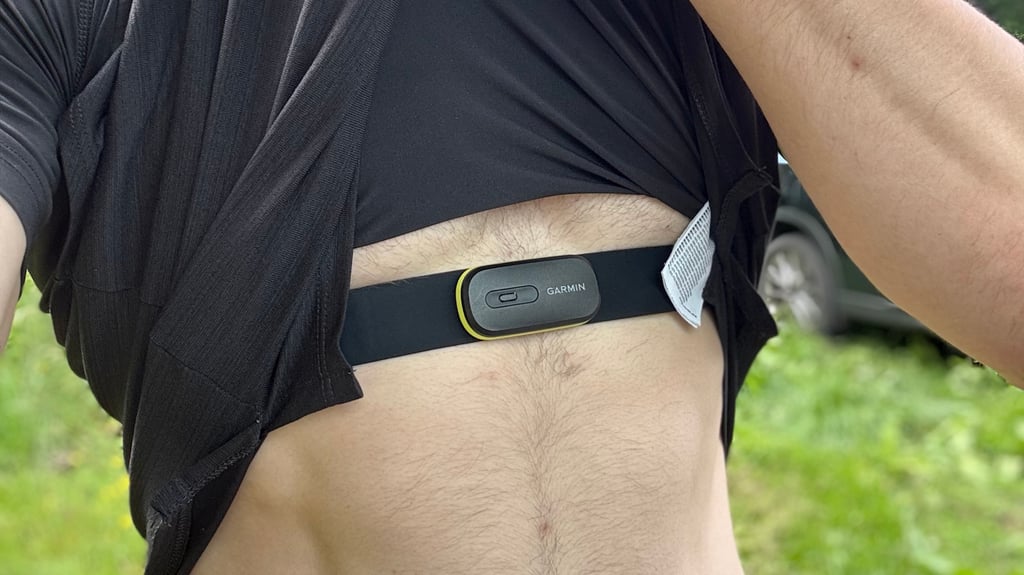
The single biggest reason this is a better day-to-day product than its predecessor is that the sensor module pops out and the strap goes straight in the wash.
After an unusual spate of UK heatwaves during marathon training this summer, I've found that this is no minor feature. In fact, as I know from wearing the previous-gen HRM-Pro Plus for years (and cleaning it in the shower), it's the difference between a strap that stays pleasant to wear and one you start dreading.
The long-standing alternative here from a rival brand is the Polar H10, and it's still a very good option. After all, chest-strap technology doesn't really move at the pace of the rest of the wearable world, so 'old' isn't the insult here that it would be for a smartwatch.
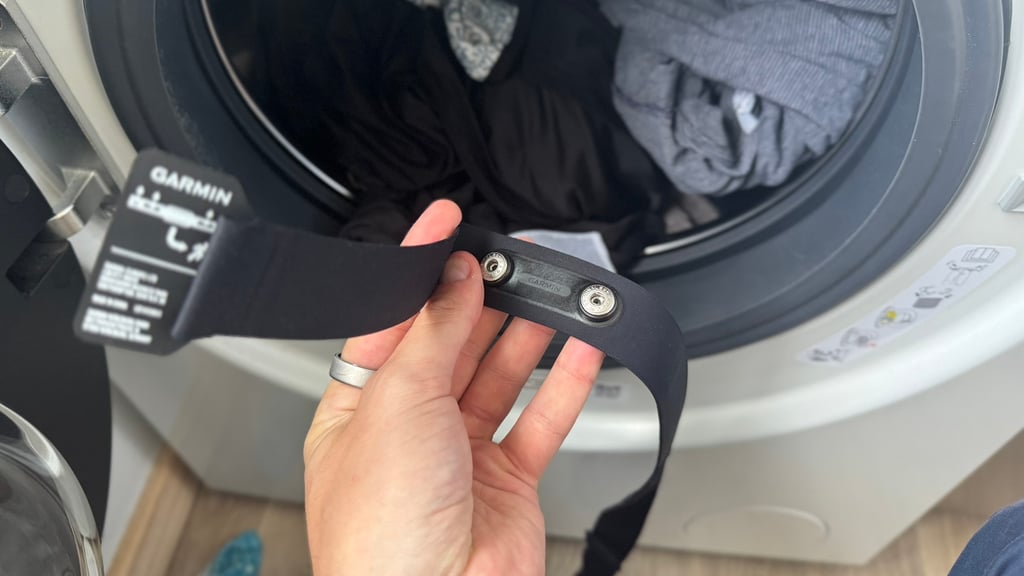
Where the HRM 600 pulls ahead is the rechargeable battery, versus the H10's coin-cell replacement routine. The trade-off is Garmin's proprietary charging clip rather than USB-C, which is a small but ongoing annoyance—but also one that's not unique to this device across the brand's range.
Battery life has also comfortably beaten my expectations—and, very slightly, what Garmin touts on the spec sheet.
The brand rates it for roughly two months at an hour of use a day. I'm using it five to six times a week, somewhere between five and ten hours weekly depending on the training block, and I'm still only topping it up once every 2-3 months.
Plus, you get all the alerts you would expect once things start running low, which means you never really feel in danger of actually losing connection.
Watch-free recording
One feature I'll admit I've underused: the HRM 600 can record an entire activity on its own, no watch required, syncing everything to Garmin Connect afterward. Since I nearly always pair it with a Fenix 8 Pro, I rarely feel the need to use it myself.
Still, if you're someone who tests or wears multiple wearables at once, like me, and don't want to strap on a full GPS watch just to passively log a gym session, basketball game, or whatever else, this is a genuinely useful option to have in your back pocket. You get the data without extra hardware on your wrist.
Running Dynamics
This is one area where the HRM 600 could justify its price or not, depending on what you actually use.
You get the usual suite of the brand's Running Dynamics insights here, plus a couple of extras you can only unlock with the HRM 600. However, they're a bit of a mixed bag.
Ground Contact Balance is, for example, one of my favorite tracked metrics across any device. It isn't exclusive to this strap, but being able to see in real time when one leg is quietly less activated than the other, or when my form is getting lazy late in a long run or deep into an interval session, has changed how I run. I don't think I'd want to train without it now.
Ground Contact Time is similarly useful, especially for anyone still learning to run efficiently. A chest strap reads this noticeably more accurately than a watch does, too. As it did with Garmin's previous-gen HRM-Pro Plus strap, this tends to sit around 220-240ms on the HRM 600, versus 250-275ms for the same pace and form on a wrist-based estimate.
The exclusive unlocks: SSL and Running Economy
Step Speed Loss (SSL) is one of the shiny exclusive metrics unlocked via the 600, measuring how much speed you lose with every foot strike—debuted alongside the Forerunner 970 last year.
Yet, I've used it since launch and remain unconvinced. Garmin benchmarks this the same way it does the rest of the Running Dynamics sets, by establishing percentiles and using scientifically backed data from analyzing millions of miles logged by runners of all levels worldwide.
That means that, like your vertical oscillation or ground contact insights, your speed loss value is plotted directly onto a static, color-coded gauge. Purple is excellent, green/blue is typical, and orange or red indicates a high braking force requiring form adjustments.
The problem is that I've essentially never seen it report anything other than the top, 'purple' 95th-percentile band for me—despite knowing from my injury history that my form has real issues—chiefly and chronically, overstriding.
I've had the rare session while running down very steep hills or trails where my SSL slipped into the lower percentiles, but never enough to really glean anything useful from it.
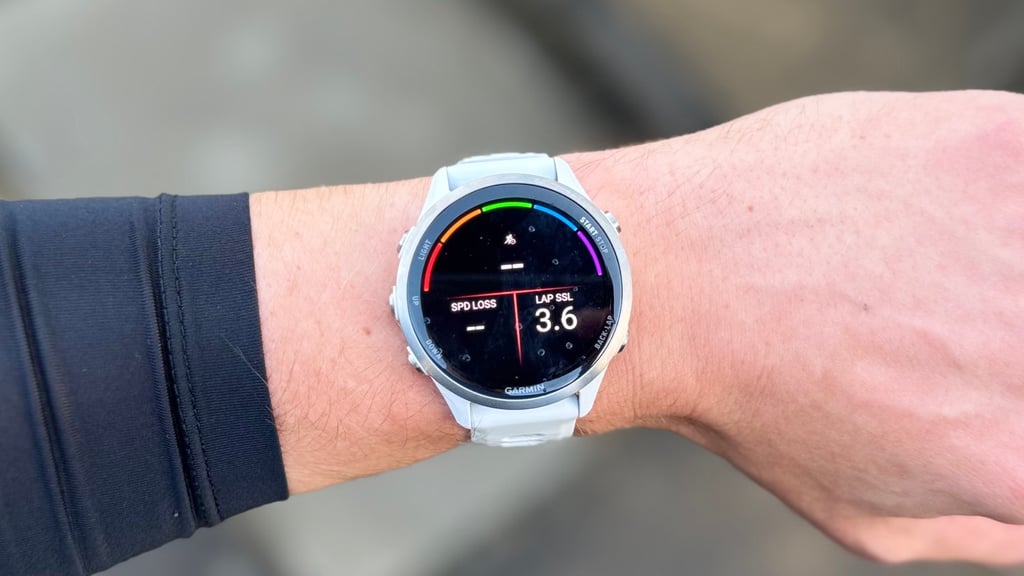
As I said when I reviewed the Forerunner 970, it's not a metric I'd recommend buying this strap for.
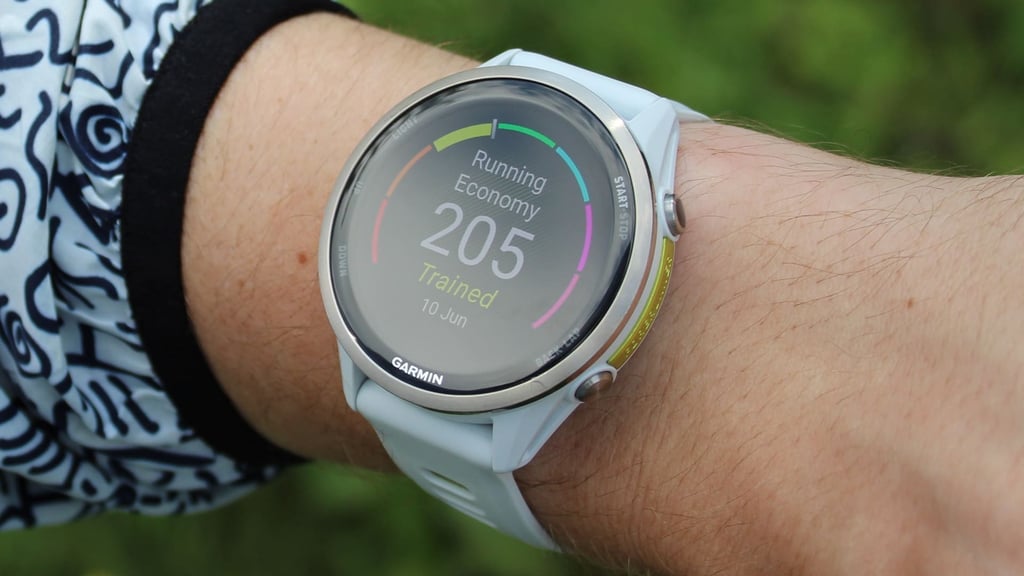
It's a similar story with 'Running Economy'—also unlocked via the HRM 600, provided you also have a compatible Garmin Watch. Since I started using the heart rate monitor, the guidance I've received on improving this figure has remained static, offering very little actionable advice.
To repeat a sentiment I often push in Garmin reviews: it's a valuable calculation that no other brand offers at this level of detail, yet it's generally up to the user to decide how to actually improve it.
For Running Economy, specifically, that means Garmin will offer good insight into how the score is calculated, but not what I need to do specifically to see an uptick.
Two smaller extras round things out: the HRM 600, Garmin says, delivers improved indoor track and treadmill pace-and-distance relay to a paired watch, and stores heart rate data during swim sessions that syncs once you're done.
I don't lean on either heavily enough in my own training to rate them with much authority, but both are sensible additions for anyone training across more than one sport.
Summary: The best way to monitor workout HR
There's very little I'd change about the Garmin HRM 600.
It's the most consistent, lowest-latency, most trustworthy heart rate tool I've tested, and after well over a year of near-daily use across every kind of session I can throw at it, it hasn't given me a single reason to doubt it.
The price and the proprietary charger are gripes—albeit minor ones. Still, cyclists and swimmers will get less value from the feature set than runners will, which certainly leaves the door open for cheaper alternatives.
For anyone intermediate or advanced who genuinely cares about beat-for-beat accuracy and wants the most reliable data possible to underpin their training, though, this is about as close to essential as a heart rate monitor gets.
If you care about the accuracy of your training data and don't mind the price, there's simply no better way to monitor the heart rate of your workouts.